One screen, a sign-up, and your first result. There is no setup
wizard — that's deliberate.
There is no setup wizard. KetoLens used to open with an
eight-screen tour and a settings page before you'd seen it do
anything, and almost nobody made it out the other side — so it's
gone. What's left is one screen, a sign-up, and your first
result. Here's the whole thing.
1. The welcome screen
One screen · about ten seconds
Open KetoLens for the first time and you get a single screen.
It makes the pitch in three lines —
Snap your meal. Catch hidden carbs. Stay in
ketosis. — over a worked example: a meal flagged
"Hidden carbs: teriyaki glaze" that still comes in at
6–9g net carbs · still keto. That example is the
entire product in miniature, which is why it's the first thing
you see.
Underneath there are exactly two doors:
Create your free account — with the terms plainly stated: 14 days free, no card needed.
Already have an account? Sign in — for a new phone or a reinstall.
Where did the tour go?
Retired in July 2026. Eight explainer screens and a settings page stood between people and the thing they'd downloaded the app to try, so we cut all of it. The explanations didn't disappear — they now appear in context, the first time you reach the screen they're about. Much better timing, much less reading.
2. Create an account
Under a minute
Three ways in — pick whichever you trust with your breakfast:
Continue with Apple — fastest on iPhone, and you can hide your email if you like.
Continue with Google — one tap if you're already signed into Google.
Continue with email — tap it and the form unfolds: an optional name, your email, and a password. It stays folded away until you ask for it, so the two one-tap options aren't buried under a form you weren't going to fill in.
The password needs at least 8 characters, upper- and
lower-case letters, a number, and a symbol — the app ticks
each rule off as you type. Already have an account?
Sign in at the bottom, or
Forgot password? if past-you was forgetful.
Verifying your email
If you sign up with email, we send a 6-digit code. Pop it in and you're through. Didn't get it? There's a Resend Code link once the short cooldown ends — check spam while you wait.
Your 14 days start here
The trial is granted the moment the account exists — by us, not by the App Store or Google Play. No card, no store subscription, nothing to cancel. See KetoLens Pro for what it includes and what happens on day 15.
3. See it work first (or dive in)
Your call · ten seconds either way
Straight after sign-up, KetoLens asks one question:
"Want to see it work first?" — offering
ten seconds on a sample meal. No photo, no camera, no keto
food required. Two buttons:
Show me a sample — we run a prepared meal through the real analysis and walk you through the result: the photo, what the AI thinks it is, the net-carb range, the hidden-carb flag, and the list of foods it found. Nothing is logged to your diary; it's a demonstration.
I'll scan my own meal — straight to the camera. If you're standing in front of lunch, take this one.
Neither is a commitment and neither is a test. The sample
exists because "point your camera at food and trust the
result" is a lot to ask of an app you installed ninety seconds
ago — it's far easier to believe once you've watched it happen
to somebody else's dinner.
4. Permissions, when you need them
Asked in context, not up front
KetoLens doesn't open with a queue of permission prompts. Each
one is requested at the moment it's actually needed, so the
reason is obvious:
Camera — asked the first time you take a photo of a meal.
Photo Library — asked the first time you pick an existing photo. Decline it and the camera still works fine.
Notifications — asked when there's something worth telling you about, like an analysis finishing. Entirely optional, and switchable any time in Settings.
Say no to any of them and the app keeps working — you'll just
be asked again next time that feature comes up. If you've
denied one permanently, your phone's own Settings app is the
only place to undo it.
About your photos
Meal photos are processed securely and kept for only 7 days, then deleted. They exist to be analysed, not archived.
5. Your home screen, decoded
The five-second version
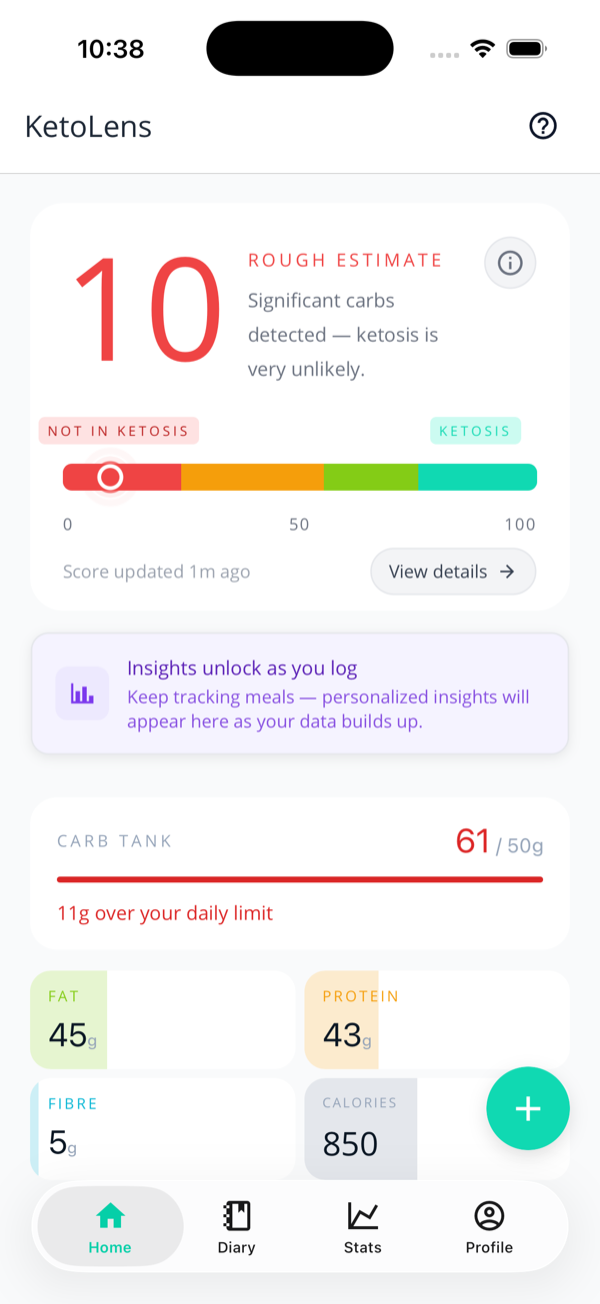
From top to bottom you'll see the
Ketosis Battery (your 0–100 score for
today), an Insights teaser, the
Carb Tank, and your
macro tiles — with the green
+ button for logging. Each part gets
the full treatment on the
Ketosis Battery page;
this is just the lay of the land.
The four tabs along the bottom — Home,
Diary, Stats, and
Profile — are where everything else
lives.
Home: battery up top, Carb Tank and macro tiles below.
The tours are still there — on demand
The ? button in the top corner replays the walkthrough for whatever screen you're on. There are around eighteen of these, one per screen, and they now fire the first time you arrive somewhere new rather than all at once on day one. Nothing is lost by skipping one.
Until you log something, Home also carries a
first-scan card pointing at the camera. It
retires itself the moment you've logged a meal — or finished
the sample scan — and doesn't come back.
6. Your carb goal, whenever you want it
Optional · a good default is already set
You are not asked to set a carb goal before you start.
Every new account begins on 25g of net carbs a day,
which is a sensible keto default, and the app simply uses it
until you say otherwise.
When you do want to change it, it lives in
Settings → Preferences
as a slider from 10g to 75g. The app labels the zone as you
drag — recommended (20–25g),
moderate (up to 30g), or
flexible beyond that — and warns you above 30g
that ketosis starts varying a lot between individuals.
Why it's not part of setup any more
Asking someone to commit to a number before they've logged a single meal is asking them to guess. Your Carb Tank and Ketosis Battery both calibrate to whatever the goal is, so changing it later costs you nothing — and by then you'll have some evidence to base it on.
That's the whole setup. Time to log something — the
logging guide covers every
way to do it.
Next: time to put it to work — the three ways to log your first meal.