One number for "am I in ketosis?" — plus the Carb Tank, hidden-carb
warnings, and the Stats screen behind it.
Most of KetoLens exists to feed one number: the
Ketosis Battery. It's our best estimate of how
likely you are to be in ketosis right now, and it sits front and
centre on your home screen. Here's what it means and what moves
it.
Your home dashboard
The home screen, top to bottom.
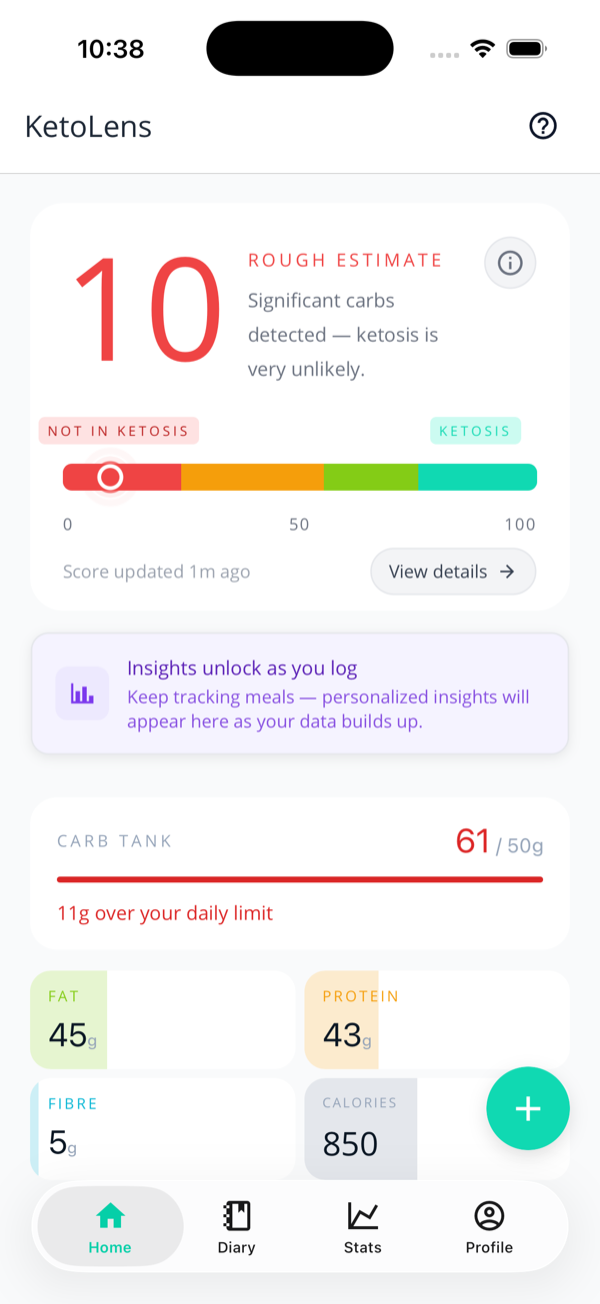
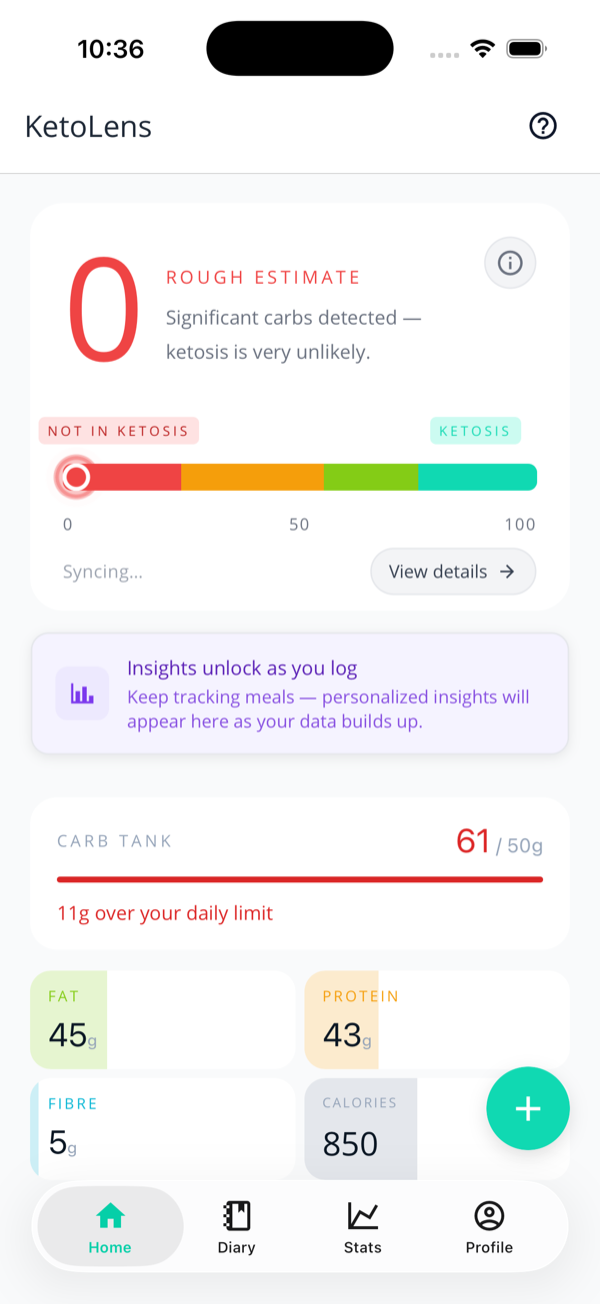
The home screen stacks four things:
Ketosis Battery — the big score, a colour-coded bar, and a one-line verdict.
Insights — personalised cards that unlock as you log (more in the diary & insights guide).
Carb Tank — net carbs used vs your daily goal.
Macro tiles — fat, protein, fibre, and calories so far today.
Tap View details → on the battery to
jump to the full Stats screen.
What the 0–100 score means
The battery runs from 0 to 100. Low means
we're confident you're not in ketosis; high means
we're confident you are. The colour and the status label move
with it:
75–100 · In Ketosis (teal) — "Great job! Your recent intake supports ketosis."
55–74 · Possibly in Ketosis (lime) — "Looking good — keep those carbs low!"
45–54 · On the Borderline (amber) — "Could go either way."
25–44 · Not in Ketosis (orange) — "Recent carb intake makes ketosis unlikely."
0–24 · Not in Ketosis (red) — "Significant carbs detected."
It's guidance, not a blood test
The battery is an estimate from your food log, not a measurement of your actual blood ketones. Everyone's metabolism is different. Want certainty? Log a ketone reading — a real measurement overrides the food-based guess.
What charges & drains it
The score looks at roughly the last 72 hours of eating, with
recent meals weighted more heavily than old ones. In plain
terms:
Charges it ▲
Low net carbs · a high share of fat in your calories · ketone readings in the 0.5–3.0 mmol/L range · logging consistently within your goal day after day · a genuine fast of 14+ hours.
Drains it ▼
Net carbs over your goal · flagged hidden carbs · alcohol in the last 48 hours · very low ketone readings · long stretches with nothing logged.
"Early Estimate" and "Rough Estimate"
New accounts (or days with very little logged) show
Early Estimate or
Rough Estimate instead of a confident verdict
— the battery is honest about not having enough to go on yet.
Log a few meals and it firms up.
Why did my score drop overnight?
Silence isn't evidence. Stop logging and the score decays — roughly halving for each quiet day — and the battery fades to a grey "outdated" state rather than pretending everything's fine. The Score Breakdown shows the deduction as an Inactivity Decay card, so the drop is never a mystery. Two things pause it: a fast the app can credit (next section), or a logged ketone reading — a real measurement always beats an assumption. (There's an in-app FAQ that answers this and more — tap FAQ on the Stats screen.)
Fasting
Skipping breakfast is doing real metabolic work, and the
battery pays for it. Go 14+ hours since your
last proper meal and a Fasting card appears
in the Score Breakdown with a small bonus — starting at 2
points and growing to 6 by the 24-hour mark, because a
full-day fast earns more than a late start.
Black coffee doesn't reset the clock. The fast is measured from your last substantial meal, so logging your morning americano honestly won't cost you the bonus. Food resets it; trivia doesn't.
It wants a steady log first. A 16-hour gap in a diary that's mostly gaps looks exactly like forgetting to log, so the bonus only pays when your recent logging is solid enough to make the fast believable. The card still appears either way and tells you what's missing.
It retires at 48 hours. Past two days of silence the app honestly can't tell a long fast from a lapse, so the bonus steps aside and the card says so.
While a credible fast is running, the inactivity decay above
waits — you won't be paid a bonus and charged a penalty for
the same empty stretch.
The Carb Tank
The Carb Tank is the simple one: net
carbs you've eaten today vs your daily goal, shown as
"61 / 50g" with a bar that fills as
you log.
Under your goal — the bar stays teal and the footer counts down "Xg remaining today".
Over your goal — it turns red and tells you how far over you are.
Empty — "Log a meal to start filling the tank."
It resets at midnight, your time, and follows whatever
carb goal you set in Settings.
One burger and fries later: the tank turns red at 11g over.
Hidden carbs
The KetoLens party trick
"Keto-friendly" food often isn't. Sauces, dressings, breading,
root veg, and anything with sneaky sugar alcohols can carry
carbs the label downplays. When the AI spots one of these, it
raises a "Possible hidden carbs" flag:
On the food item, during analysis and in your diary, as an amber pill.
On the Stats screen, totted up under "Carb Intelligence" as "⚠️ X hidden carb warnings this period", with the offending meals listed.
Each warning nudges your battery down a little — they're a
real signal, not decoration. Disagree with one? You can
dismiss it on the food's edit sheet, and it stops counting
against your score.
The Stats screen
Tap Stats in the bottom bar (or
View details on the battery) for the full
story behind the number. Switch ranges at the top —
Today, 7D, and (on Pro)
30D and Custom.
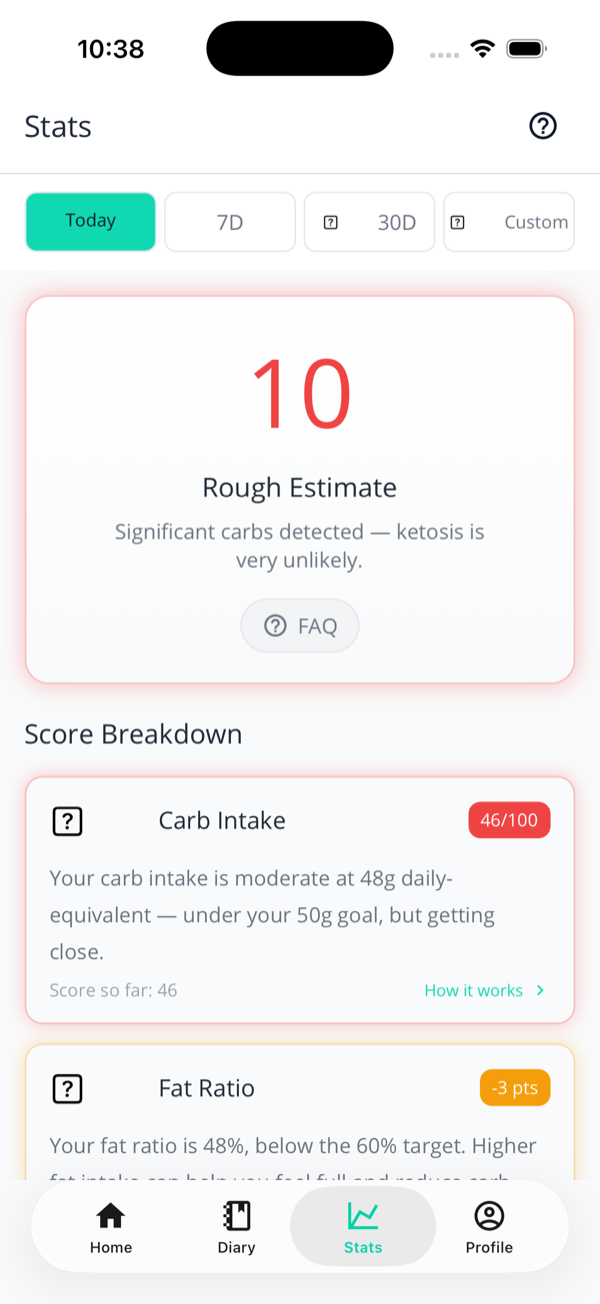
Today's view: the score, then a plain-English breakdown of how it got there.
Today — the score breakdown
The Score Breakdown tells the story
as a series of cards — Carb Intake, Fat Ratio, Hidden
Carb Warnings, Ketone Reading, Consistency, Alcohol
Brake, Fasting, and (if you've
gone quiet) Inactivity Decay. Only the ones that
actually applied show up. Each shows its points and a
one-line reason — "Your carb intake is moderate at 48g
daily-equivalent — under your 50g goal, but getting
close" — and tapping a card opens the full working.
No black box.
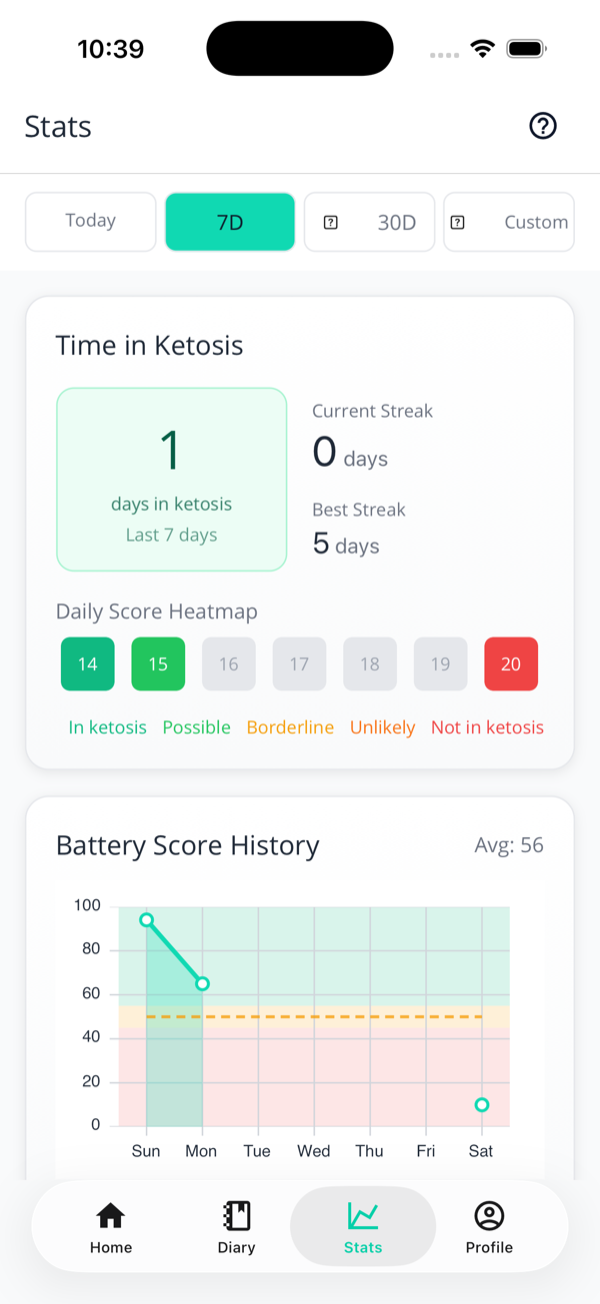
The 7-day view: days in ketosis, streaks, a colour-coded heatmap, and your score history.
7D / 30D — trends & streaks
Pick a longer range and you get the bigger picture:
days in ketosis, your current and best
streak, a daily score
heatmap, and a Battery Score
History chart with the ketosis threshold
marked.
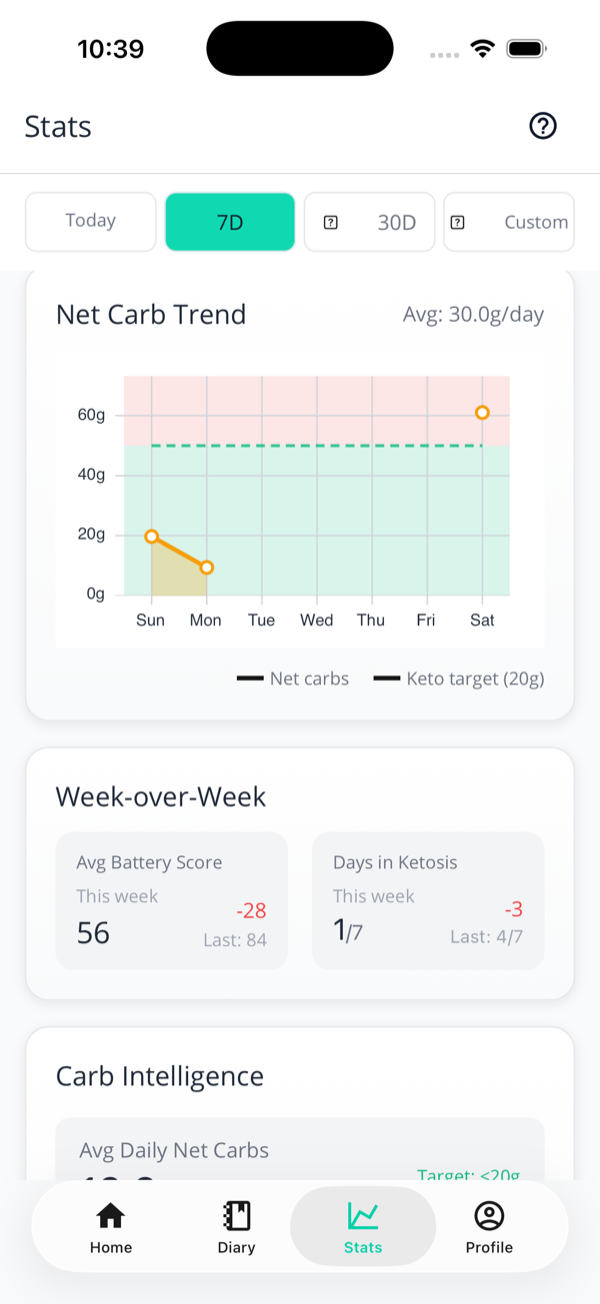
Net-carb trend and week-over-week comparison.
Net carbs & week-over-week
Below that: a Net Carb Trend line
against your keto target, and a
Week-over-Week comparison so you can
see whether this week beat the last — average score and
days in ketosis, with the change called out.
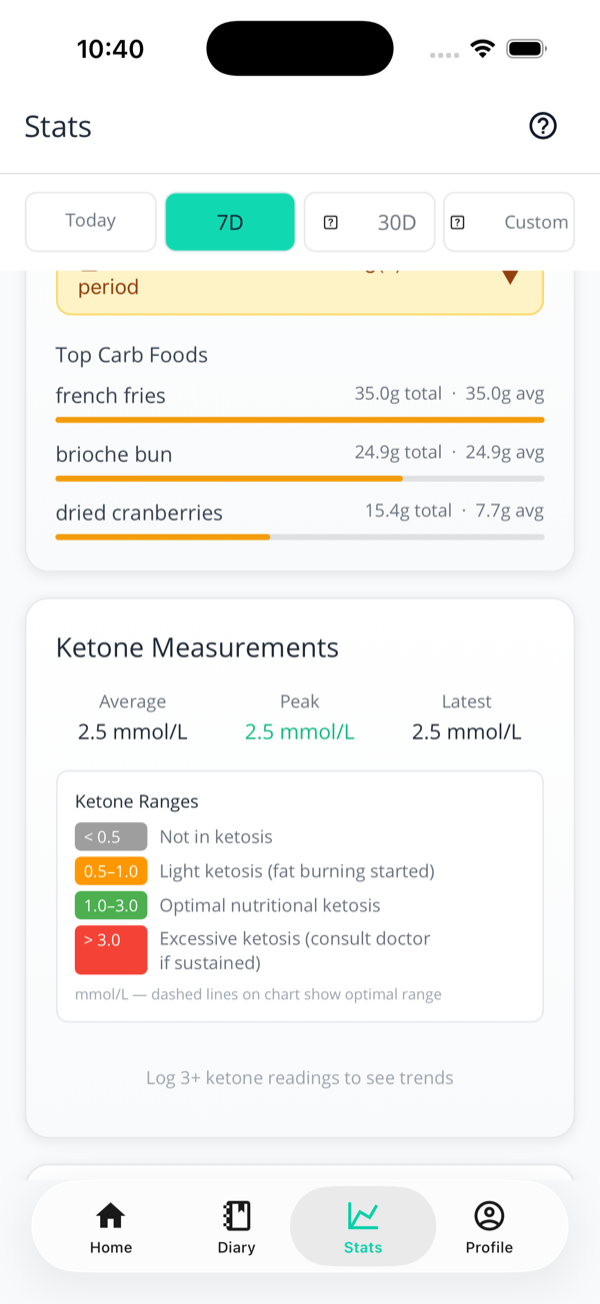
Carb Intelligence: the foods quietly costing you, plus your ketone summary.
Carb Intelligence
Top Carb Foods ranks the items adding
the most carbs over the period — useful for spotting a
habit. If you log ketones, your readings are summarised
here too. The deepest insights (carb thresholds, meal
timing, correlations) are a Pro
feature.
Next: tired of the AI guessing your go-to foods? Teach it with the Pantry.